
YouTube video length analyzer
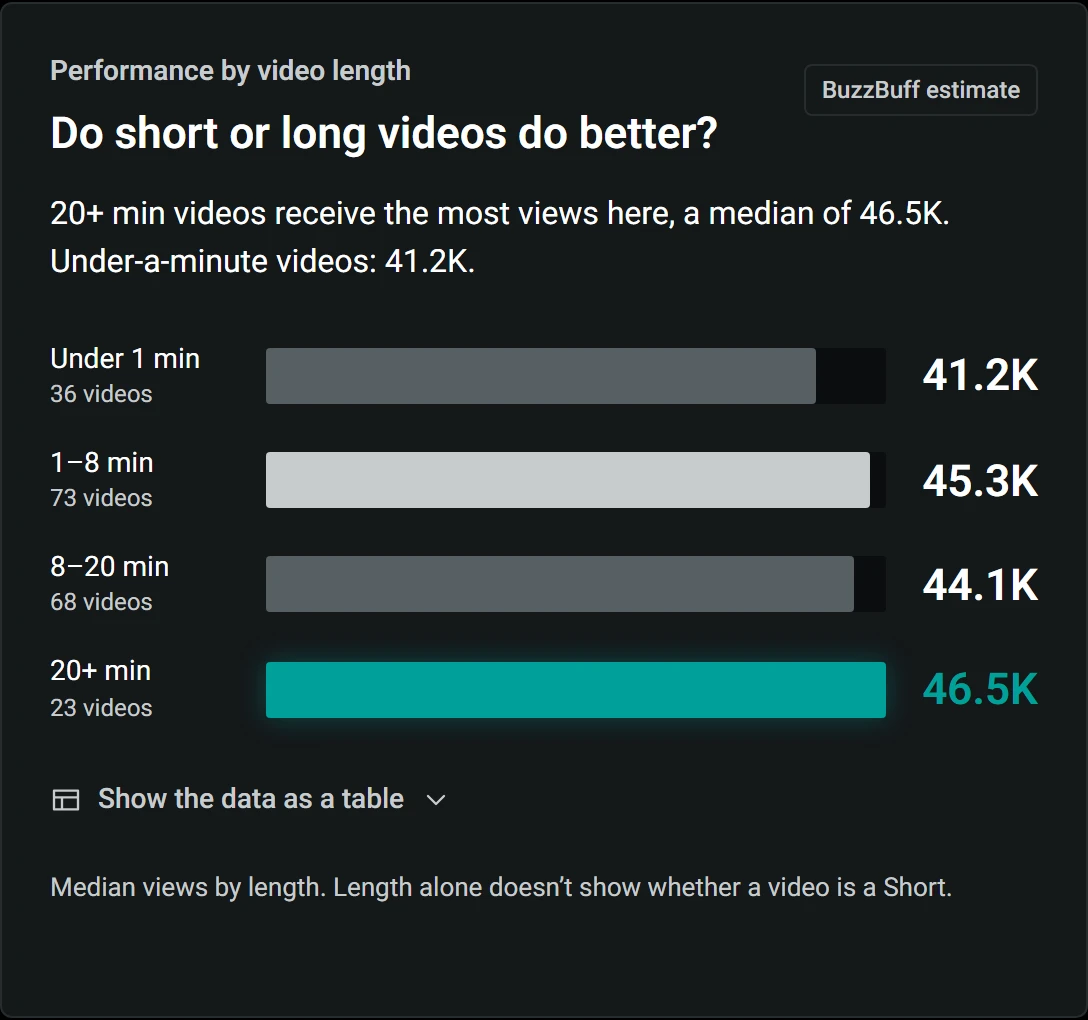
BuzzBuff groups a YouTube channel’s latest uploads by duration and compares median lifetime views for each group. The four groups are under 1 minute, 1 to under 8 minutes, 8 to under 20 minutes, and 20 minutes or longer. Use them to see whether shorter or longer videos have received more views on that channel.
How to read it
- Each bar shows the group’s median lifetime views, a BuzzBuff estimate. The chart also shows how many videos contributed to each group.
- Check the video count. A group with few videos gives you little evidence about how that length usually performs.
- The chart uses lifetime views without adjusting for video age. Older uploads may have had more time to collect views.
- A higher median suggests a length worth testing. It cannot establish that the length caused the difference.
How it works
Paste a channel
Use a public YouTube channel URL, @handle or channel ID.
Open the channel analyzer
Submit the channel to continue to the analyzer and build the report.
Find Performance by video length
Compare median views across the bars and check the number of videos in each group.
Frequently asked questions
Does BuzzBuff publish an ideal YouTube video length?
No. BuzzBuff compares duration groups within the channel you choose. It does not publish a universal ideal length.
Does the shortest group contain only Shorts?
BuzzBuff groups videos by duration alone. That does not identify which videos YouTube classifies as Shorts.
What if a video has no known duration or view count?
A video needs both a known duration and a known view count to contribute to a duration group.
What does the dash next to a group mean?
There are no sampled videos with known views in that duration group, so the report has no median to show.