
Best time to post on YouTube, for your channel
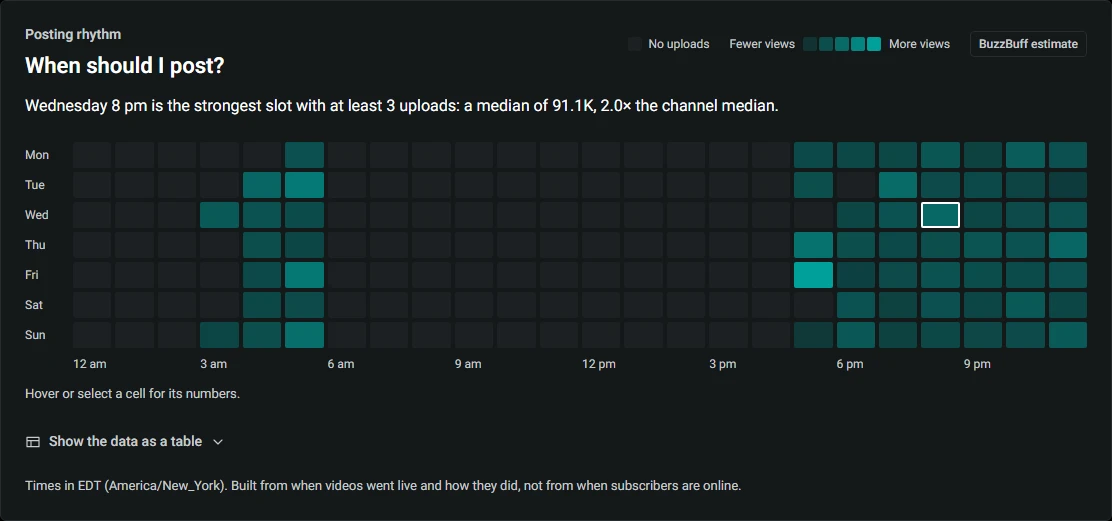
There is no single best time to post on YouTube. BuzzBuff reads up to a channel’s latest 200 public uploads and colours a weekday-by-hour grid by median lifetime views for each slot. Compare past results in your browser’s time zone when signed out or your account time zone when signed in.
How to read it
- Select a cell to see how many sampled uploads had known views in that slot and their median. The medians are BuzzBuff estimates.
- Check the sample size. A slot with few uploads gives you little evidence. The report only highlights a strongest slot if at least one has 3 uploads with known views.
- The chart uses lifetime views without adjusting for video age. Older uploads may have had more time to collect views.
- A higher median suggests a time worth testing. It cannot establish that posting at that hour caused the difference.
How it works
Paste a channel
Use a public YouTube channel URL, @handle or channel ID.
Open the channel analyzer
Submit the channel to continue to the analyzer and build the report.
Find Posting rhythm
Compare weekday and hour cells, then check how many uploads each median represents.
Frequently asked questions
Does BuzzBuff publish a universal best time to post on YouTube?
BuzzBuff does not publish a universal best time to post. The chart shows which weekdays and hours had higher median views in the channel’s own upload sample.
Which time zone does the posting chart use?
It uses your account time zone when you’re signed in and your browser’s time zone when you’re signed out, with UTC as the fallback.
Does the chart show when my viewers are online?
No. It uses public publication times and view counts. Audience activity is private channel data.
What does an empty cell mean?
The sample has no uploads with known views in that weekday and hour. A zero view count is included when it’s known.