
Content strategy / 6 min read
Turn rough YouTube notes into a script you can film
Use Ask Buzzi to organise your own notes into a filming outline, question missing details and keep the final script accurate and personal.


The quick answer
Turn rough YouTube notes into a filmable script by separating what the viewer needs to understand from what you can actually show. Paste your own notes into Ask Buzzi and request an ordered outline with missing facts clearly marked. The chat provides general writing help without attached channel data. Verify the draft, rehearse the demonstration and keep the language that sounds like you.
What you’ll take away
- Give the assistant your audience, materials and verified observations before asking for an outline.
- Use a first draft to expose gaps in the demonstration, then write the final explanation yourself.
- Save a separate production copy; anonymous chats stay on the page and older conversation context can be omitted.
In this guide
Start with your evidence, not a blank script request
Rough notes are often a mixture of useful facts, unfinished thoughts and lines that sounded good at the time. Asking for a polished script immediately can hide that uncertainty beneath fluent wording. First separate what you know, what you can demonstrate and what still needs checking.
Imagine you are filming a visible-mending tutorial for a torn denim pocket. Your notes include the needle you used, the fabric backing, two failed stitch attempts and the repaired pocket. That is material with a clear origin. A claim that this method lasts longer than every alternative is different: unless you tested it properly, it does not belong in the factual brief.
Also name the viewer's starting point. Someone who has never threaded a needle needs different instructions from a regular sewer looking for a decorative finish. Write that distinction into the request so the outline can focus on the right explanations.
Use Ask Buzzi to organise the notes
Open New chat at buzzbuff.com. Ask Buzzi, BuzzBuff's AI creative partner, offers help with hooks, storytelling and the creative process. Its general chat uses the text you provide; it does not inspect your footage, read your channel's analytics or retrieve evidence from a pasted video link. Keep the request within your own notes and treat the response as a draft.
Anonymous and free access include three questions daily, while Pro includes fifty. The visible allowance and shared capacity still apply. Use Quick for this straightforward planning task; Deep may be unavailable for the current model configuration. A longer response is not necessarily a more useful filming plan.
Put a concrete brief in Your question
State the audience, the task, what you filmed or tested and the constraints. Paste your own notes and ask for an ordered outline rather than a finished claim-heavy script. Select Send.
Request a practical revision
Read the answer against your materials. Use a follow-up to fix a specific weakness, such as an instruction that assumes the viewer already knows a tool. Ask the assistant to mark unknown facts instead of filling them in.
Copy a working draft
Use Copy answer and move the outline into your own production document. Add your shot list, verified wording and remaining filming tasks. Keep the final version under your control as you rehearse and edit.
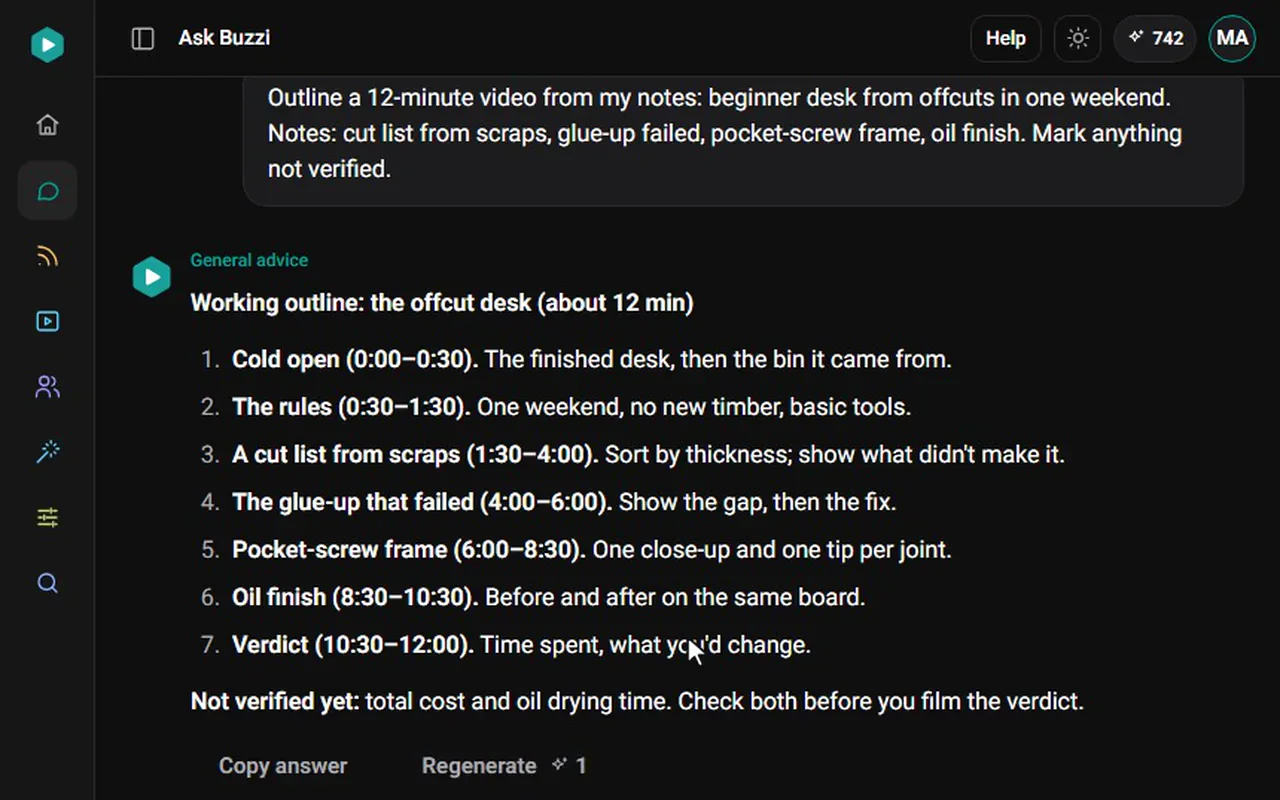
A prompt that produces something you can check
Try this with your own material: “Help me order a beginner tutorial about repairing a torn denim pocket. My notes are below. For each stage, name the question the viewer needs answered, the action I should show and any missing information. Use only facts in my notes. Mark gaps as CHECK. Keep the failed attempt because it explains why I added a fabric backing.”
This request gives the assistant a defined editing job. It asks for observable actions and preserves a relevant detail from your process. It does not ask the model to invent a personal story, claim it tested the method or predict how many viewers will stay.
If the first outline skips from preparation to a finished repair, follow up with the exact missing step. For example: “Add the point where I position the backing, using my note that it extends beyond the tear. Do not invent a measurement.” Each revision should resolve something you can identify in the draft.
| Draft problem | Ask Buzzi to help with | Your responsibility |
|---|---|---|
| Notes are out of order | A sequence of viewer questions and actions | Confirm the demonstration works in that order |
| A step assumes too much | A clearer beginner explanation | Verify the tool and technique details |
| The script repeats itself | Identify repeated points | Keep necessary visual pauses and context |
Rehearse the demonstration before polishing every line
Place the materials in front of you and work through the outline. A sentence that reads smoothly may require a camera angle you cannot get, a step you have not filmed or an outcome you cannot reproduce. Mark those problems while the plan is still easy to change.
Speak the important explanations aloud and time the actual actions. Leave room for the viewer to see the needle position or the finished stitch. If the runtime grows, remove an unnecessary detour before speeding through the part that teaches the task. Check every factual claim and replace generic phrasing with the way you would explain the process to a beginner beside you.
Use your own footage and observations throughout. AI assistance can organise your work, but it cannot supply the missing demonstration or turn another creator's script into your firsthand experience.
Keep the version you intend to film
Signed-in chats can be saved privately to your account. Check the save status before leaving; if a response was not saved, copy it. Anonymous conversations remain on the current page, and signing in starts a new conversation rather than preserving that unsaved thread. In either case, keep the production version in your own document.
Recent turns provide context, but older turns may be omitted. When the discussion gets long, restate the current brief and verified facts. Finish with a short list of what to film, what to say precisely and what still needs checking. That is a script you can act on, even when some sections remain speaking notes.
Frequently asked questions
Can Ask Buzzi watch my video and write the script from it?
The general chat in this workflow accepts text and has no footage or channel data attached. Paste your own notes and descriptions; do not assume a video link gives it access to the contents.
Do I need to script every sentence?
No. Write exact wording where accuracy matters, then use clear speaking notes for sections you can explain naturally. Rehearse the actions as well as the words before deciding what needs more detail.
Will my outline be saved if I am not signed in?
No. An anonymous conversation stays on the page. Use Copy answer to keep it, or sign in before starting a new conversation you want saved to your account.


