
YouTube SEO / 6 min read
Write YouTube titles that match what viewers want
Write clearer YouTube titles with a viewer-intent brief, realistic examples, and the BuzzBuff Title generator. Check every suggestion against your actual video.


The quick answer
A useful YouTube title makes a clear promise your footage can keep. When you are stuck on the wording, the BuzzBuff Title generator turns your topic and constraints into ten alternatives to compare. Choose the version that best names the viewer's task and your actual result; the suggestions are drafting help, not click predictions.
What you’ll take away
- Define the viewer, task, and outcome before polishing the wording.
- Use the Title generator for alternatives, then remove unsupported claims and vague promises.
- Judge title changes with your own Studio evidence and a written hypothesis.
In this guide
Decide what the viewer is choosing
A person searching for a repair and a person browsing for entertainment may want different things from the same subject. Before drafting, finish this sentence: “This video helps this viewer do or understand this.” If you cannot finish it clearly, the problem may be the video concept rather than the headline.
Consider a bicycle-maintenance tutorial. “My Weekend Bike Project” describes the creator's activity. “Fix a Squeaking Bike Brake: Three Checks Before Replacing Parts” describes a viewer problem and a defined process. Use that version only if the video really covers those checks. The number should describe the content, not decorate it.
YouTube's title guidance recommends accuracy and concise wording. Apply that advice by removing introductions, redundant adjectives, and promises your demonstration cannot support. Keep the subject understandable when someone sees the title without knowing your channel.
How the BuzzBuff Title generator gets you past the first draft
Open the Title generator at buzzbuff.com and enter your draft or topic. Ten starting points give you alternatives to compare immediately, so you can spend your effort selecting the clearest promise instead of staring at an empty title field. The tool uses your text, not channel analytics. Copy the options you want to keep; drafts and results are not saved by BuzzBuff.
Try: “Beginner tutorial for renters mounting a small shelf. Demonstrates measuring, choosing suitable fixings, and checking level. Avoid claims about every wall type or zero damage. Give clear, accurate title options.” This supplies the audience and boundaries up front.
Choose two or three suggestions with different emphases. One could foreground the task, another a common mistake, and another the finished result. If they all describe the same promise with different punctuation, edit the brief instead of generating endless rounds.
Give the Title generator a usable brief
Open the Title generator and fill in Your draft title or topic. Include who the video helps, what you demonstrate and any claim to avoid. Specific inputs give you more useful choices than a broad subject such as “DIY tips”.
Generate and compare ten options
Select Generate 10 titles, then shortlist two or three different promises. Check every number, comparison and outcome against the footage. Reject a catchy suggestion if the video cannot deliver it.
Copy the title you can defend
Use Copy for an individual title or Copy all to save the options in your own notes. Polish the strongest accurate draft, publish it in Studio and record why you chose it. The Title generator removes the blank-page problem while you keep control of the final promise.
| Pain point | BuzzBuff feature | Your next action |
|---|---|---|
| Stuck on one headline | Title generator | Generate ten alternatives from your brief |
| Generic suggestions | Title generator topic field | Add the audience, result, and constraints |
| Unsure which pattern to explore | Pro Title DNA | Review public title patterns, then draft a test |

Check clarity, fit, and proof
Read each option as a new viewer. Identify the main subject, expected result, and any condition that matters. Then watch the first part of the video and ask whether it starts delivering that promise. This is a practical editorial check, not a scientific prediction of audience behaviour.
| Draft | Useful revision | Why it is clearer |
|---|---|---|
| You Need This Desk Upgrade | Build a Cable Tray for a Small Standing Desk | Names the project and setting |
| The Best Budget Microphone | Two Budget Microphones Tested in an Untreated Room | Matches the scope of the comparison |
| This Changed My Garden Forever | Grow Salad Leaves in a Shallow Balcony Planter | States an outcome the video can demonstrate |
Use channel patterns as questions, not formulas
BuzzBuff Pro's Title DNA compares median views for titles with numbers, questions, brackets, and different lengths. Use these patterns to choose a drafting experiment. Subject, upload age, and format can explain differences; adding a number alone does not establish a route to higher views.
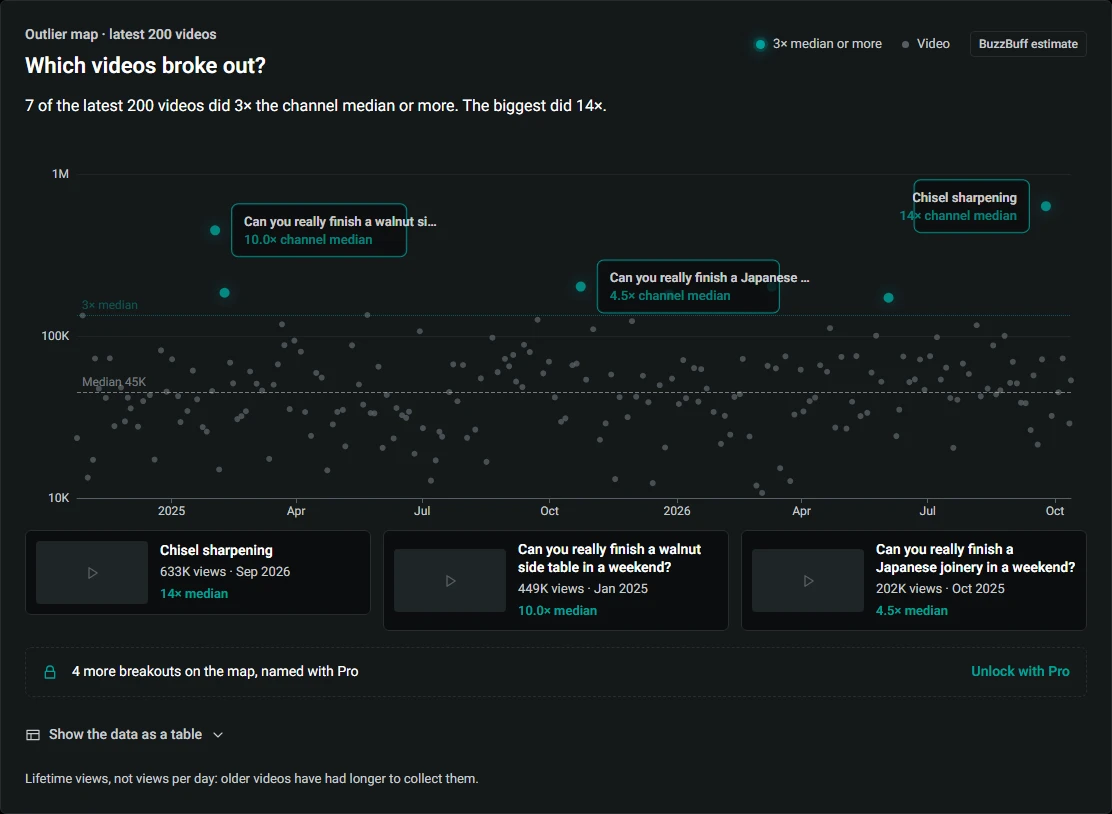
Use the outlier map to open a few relevant examples and examine their promises manually. Ask what a viewer could understand from the wording, and whether that clarity applies to your next video. Keep your title grounded in your own material rather than copying the structure of the largest breakout.
Review a title change as a hypothesis
If you revise a published title, save the previous version and record why you changed it. “The task was unclear” is a more useful hypothesis than “the algorithm disliked it.” Note the date and any other changes, including the thumbnail or promotion, so you can interpret what follows.
Use your own YouTube Studio for impressions and click-through rate, which BuzzBuff's public reports cannot provide. YouTube explains that click behaviour varies by traffic source and audience. A change in aggregate click-through rate does not isolate the title's effect, especially if the video is reaching a different audience.
Keep a short library of titles you can explain: what promise each made, what the video delivered, and what you learned. Over time, that record is more useful than memorising a list of supposedly irresistible words. Your aim is to make the right viewer's choice easier and then reward that choice with the content.
Frequently asked questions
Can BuzzBuff generate YouTube titles for free?
The Title generator offers three free generations a day, with ten suggestions per generation. Availability is subject to the tool's displayed request and shared-capacity controls. Check every result for accuracy.
Are Title generator suggestions based on my channel?
No. The current Title generator works from the text you provide. It does not access your channel analytics or produce performance predictions.
Should I put a keyword in every YouTube title?
Use language that clearly names the video's subject when it fits the viewer's task. Avoid forcing unrelated phrases into a title or weakening the promise just to repeat a keyword.


